
PROJECT CONTROLS TEMPLATE
Project Controls Setup Template
Setting up effective project controls requires more than creating individual registers or reports. The Project Controls Setup Template provides a structured Excel framework to define control requirements, establish governance, align WBS and CBS structures, connect schedule and cost controls, set progress and forecasting methods, manage risk and change interfaces, and organize project-control information. It also helps teams review, approve, and maintain the controls framework throughout the project lifecycle.
Excel Template · Project Controls
ABOUT THE TEMPLATE
A Structured Framework for Setting Up Project Controls
The Project Controls Setup Template is an Excel-based project-controls workbook that helps teams design and document the control environment before and during project execution. It brings key control requirements, governance, structures, measurement methods, information flows, and review processes into one connected framework.
The template connects project context with control requirements, governance, WBS/CBS and coding, schedule and cost controls, progress and performance measurement, forecasting, risk, change, reporting, data quality, and revision controls. As a result, teams can establish a consistent foundation for measuring performance, forecasting outcomes, managing exposure, and supporting project decisions.
Establish Project Context
Define the project environment, delivery model, contract setting, phase, stakeholders, systems, complexity, reporting needs, and other factors that determine how the project controls framework should operate.
Define Control Requirements
Identify the controls the project needs across scope, schedule, cost, resources, progress, performance, forecasting, risk, change, procurement, reporting, data, and governance, then assign appropriate owners, frequencies, sources, and thresholds.
Build the Control Structure
Establish the WBS, CBS, coding, control levels, control accounts, responsibilities, schedule and cost interfaces, and measurement levels that connect project scope with time, cost, resources, and performance.
Measure, Forecast & Govern
Define progress and performance methods, forecasting rules, risk and change interfaces, reporting and data requirements, then review, approve, revise, and maintain the controls framework throughout the project lifecycle.
WHAT’S INCLUDED
Everything You Need to Set Up Project Controls
The workbook brings project context, control requirements, governance, WBS/CBS and coding, schedule and cost controls, progress measurement, forecasting, risk, change, reporting, data, and review into one connected Project Controls framework. Each section supports a defined stage of establishing, operating, reviewing, and improving the project’s control environment.
01
Project Profile
Establish the project, contractual, organizational, delivery, and operational context required to understand the control environment, project characteristics, key stakeholders, systems, reporting needs, and conditions shaping project controls.
02
Controls Requirements
Define the controls the project needs across scope, schedule, cost, resources, progress, performance, forecasting, risk, change, procurement, reporting, data, and governance, while assigning owners, frequencies, sources, thresholds, and requirements.
03
Controls Framework & Governance
Define controls responsibilities, ownership, authority, interfaces, escalation routes, review forums, decision rights, reporting governance, and accountability so teams can manage project-control information consistently throughout project execution.
04
WBS / CBS / Coding
Establish the common control structure by connecting WBS, CBS, coding, control levels, control accounts, responsible organizations, schedule levels, cost levels, progress measurement, performance measurement, and resource structures.
05
Schedule & Cost Controls
Define schedule, cost, resource, baseline, update, variance, commitment, forecast, calendar, constraint, progress, and change-control requirements while connecting time and financial performance within the project controls framework.
06
Progress / Performance / Forecasting
Establish progress measurement, KPIs, productivity measures, performance thresholds, resource indicators, forecasting methods, assumptions, reporting frequencies, and EVM measures where applicable to support reliable performance analysis and forecasting.
07
Risk / Change / Trends
Connect project risks, uncertainties, trends, and changes with affected control areas, schedule and cost impacts, forecast exposure, responses, ownership, escalation, and status so teams can identify emerging conditions and manage forward exposure.
08
Reporting / Data / Information
Define data sources, ownership, validation, quality checks, reporting requirements, audiences, frequencies, distribution, traceability, and source references so project-control information remains consistent, reliable, timely, and useful for decisions.
09
Review / Approval / Revision
Review the controls framework through validation, findings, actions, approval, effective dates, version control, and revision history, then maintain the approved framework as project requirements, performance, and control needs evolve.
HOW TO USE THE TEMPLATE
From Project Context to Controlled Project Controls
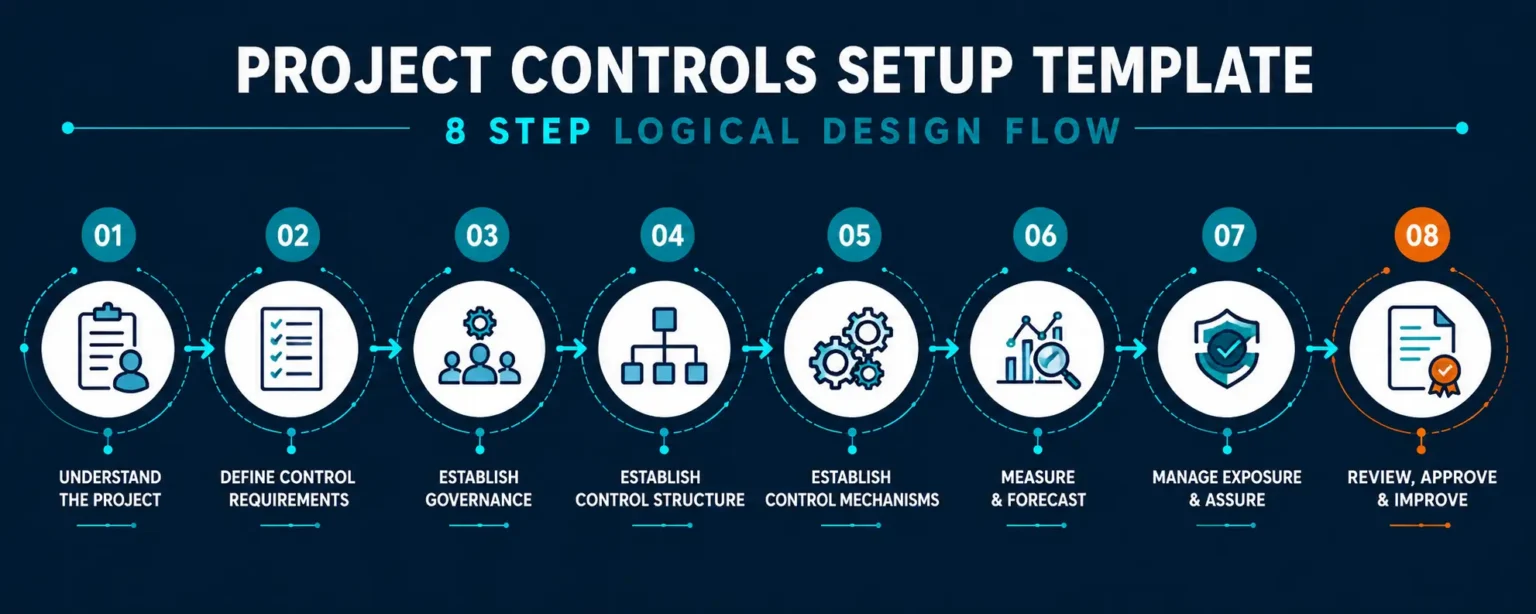
Use the Project Controls Setup Template as a progressive setup workflow rather than as a collection of separate worksheets. First, establish the project context and control requirements. Then define governance, build the common control structure, establish schedule and cost controls, set measurement and forecasting methods, connect risk and change information, organize reporting, and complete review and approval.
1. Establish the Project Context
Start with the Project Profile and record the project, contract, delivery environment, phase, stakeholders, systems, reporting needs, and other factors that shape the project-controls environment. This gives the team a clear context before defining specific control requirements.
2. Define Control Requirements
Use Controls Requirements to identify what the project needs to control across scope, schedule, cost, resources, progress, performance, forecasting, risk, change, procurement, reporting, data, and governance. Then define suitable owners, frequencies, sources, outputs, and thresholds.
3. Establish Governance & Ownership
Use Controls Framework & Governance to define responsibilities, ownership, authority, interfaces, escalation routes, review forums, decision rights, and reporting governance. Therefore, each control activity has clear accountability and defined management interfaces.
4. Build the Common Control Structure
Use WBS / CBS / Coding to connect project scope, cost, schedule, resources, control levels, control accounts, organizations, and performance measures. Establish a consistent structure so teams can align information across different project-control processes.
5. Define Schedule & Cost Controls
Use Schedule & Cost Controls to establish requirements for schedules, baselines, calendars, updates, progress, cost, commitments, forecasts, resources, variances, and changes. In addition, define the interfaces that connect schedule and financial performance.
6. Establish Measurement & Forecasting
Use Progress / Performance / Forecasting to define how teams will measure progress, evaluate KPIs, monitor productivity, assess performance, and develop forecasts. Where appropriate, include EVM measures, forecast assumptions, thresholds, and reporting frequencies.
7. Connect Risk, Change & Information
Use Risk / Change / Trends to connect emerging exposure with schedule, cost, performance, and forecast impacts. Next, use Reporting / Data / Information to define information sources, validation, data quality, reporting, ownership, distribution, and traceability.
8. Review, Approve & Maintain
Complete Review / Approval / Revision to validate the controls framework, resolve findings, record approval, establish effective dates, and maintain revision history. Finally, update the framework when project requirements, systems, governance, performance, or control needs change.
Build the Controls Framework Before Managing Performance
Effective project controls start with a clear framework for requirements, ownership, structure, measurement, information, forecasting, risk, change, and reporting. Use the template to establish this foundation before execution, then review and refine it as project conditions and control requirements evolve.
PROJECT CONTROLS SETUP
Define the Key Dimensions of an Effective Project Controls Environment
An effective project controls environment connects project requirements, governance, control structures, schedule and cost, performance, forecasting, risk, change, reporting, and assurance. This template brings these dimensions together so teams can establish a clear, integrated, and project-specific controls framework.
Project Context
Define the project environment, delivery model, contract conditions, phase, schedule and cost characteristics, stakeholders, systems, ownership, and other factors that shape the project controls environment.
Controls Requirements
Identify the controls required for scope, schedule, cost, resources, progress, performance, forecasting, risk, change, procurement, reporting, data, and governance while defining owners, frequencies, sources, outputs, and thresholds.
Governance & Control Structure
Establish responsibilities, authorities, interfaces, escalation paths, review forums, decision rights, WBS, CBS, coding, control levels, control accounts, and ownership to create a consistent foundation for project control.
Schedule, Cost & Resources
Define schedule, cost, baseline, resource, update, variance, forecast, and change-control requirements while connecting time, financial, and resource information for integrated project performance management.
Progress, Performance & Forecasting
Define progress measurement methods, completion criteria, KPIs, productivity measures, resource performance, variance thresholds, forecasting methods, assumptions, and EVM requirements where applicable.
Risk, Change & Trends
Capture risks, uncertainties, trends, changes, potential impacts, responses, ownership, escalation, and status while connecting forward-looking conditions with schedule, cost, progress, and forecast considerations.
Data, Reporting & Information
Define data sources, ownership, validation, quality checks, reporting requirements, audiences, frequencies, distribution, reconciliation, and traceability so project-control information remains consistent, timely, and reliable.
Review, Approval & Revision
Review the controls framework, record findings and actions, obtain approval, establish effective dates, and maintain revision history so the project controls environment remains governed, current, and aligned with project needs.
PROJECT CONTROLS SETUP STATUS
Use Status to Track the Controls Framework Lifecycle
The template uses structured status classifications to help project teams understand the current stage of the controls setup, identify outstanding actions, confirm review and approval requirements, track implementation, and maintain the framework as project requirements evolve.
Draft
Controls Being Developed
The project controls framework is being developed, with project context, control requirements, governance, structures, processes, measurement methods, reporting needs, and other supporting information being documented for review.
Under Review
Controls Being Reviewed
The controls framework has been prepared for review, and designated reviewers are evaluating its requirements, responsibilities, structures, control methods, measurement rules, reporting arrangements, and supporting information before approval.
Revision Required
Updates Being Addressed
The controls framework requires identified updates, clarifications, additional information, or corrections before approval. The project team should document the required actions, assign owners, and track them through completion.
Approved
Controls Authorised
The controls framework has received the required review and approval, with its requirements, responsibilities, control structures, measurement methods, reporting arrangements, and governance requirements formally accepted for project use.
Active
Controls In Use
The approved controls framework is currently active and guides project controls activities, including schedule, cost, progress, forecasting, risk, change, reporting, data management, reviews, and performance monitoring.
Superseded
Previous Framework Retained
The controls framework no longer represents the current approved approach because a subsequent revision has replaced it. The project team should retain the previous version, approval records, and revision history to preserve traceability and document control.
FROM PROJECT CONTEXT TO CONTROLLED PROJECT CONTROLS
Build a Connected Framework for Project Controls
An effective project controls environment requires more than separate schedules, cost reports, and registers. The template connects project context, control requirements, governance, control structures, schedule and cost controls, performance measurement, forecasting, risk, change, reporting, data, and assurance into one structured framework.
Establish Project Context
Understand the Project Environment
The template begins by establishing the project context, including project identity, delivery environment, contract conditions, project phase, stakeholders, systems, ownership, schedule and cost characteristics, and other information needed to understand how the project controls framework will operate.
This creates a clear reference point before detailed control requirements are established and ensures that the framework reflects the project’s actual operating environment, governance needs, and control objectives.
Define Control Requirements
Document the controls required for scope, schedule, cost, resources, progress, performance, forecasting, risk, change, procurement, reporting, data, and governance while defining the owners, frequencies, sources, outputs, thresholds, and requirements that the project controls framework must satisfy.
Establish Governance & Structure
Define responsibilities, authorities, interfaces, escalation paths, review forums, decision rights, WBS, CBS, coding, control levels, control accounts, and ownership while establishing the common structure required to connect project scope, schedule, cost, resources, progress, and performance information.
Define Control Methods
Establish schedule, cost, resource, progress, performance, forecasting, risk, change, reporting, and data-control requirements while defining the methods, measures, sources, thresholds, interfaces, and review practices that guide consistent project controls throughout project execution.
From Control Structure to Integrated Management
Connect Control Methods With Project Performance
An effective controls framework becomes valuable when its governance, structures, control methods, measurements, forecasts, risk information, reporting, and review processes remain connected. The template provides a structured path from defining requirements to maintaining a controlled project-controls environment.
Define Schedule, Cost & Resources
Establish schedule, cost, baseline, resource, update, variance, forecast, and change-control requirements while connecting time, financial, and resource information to support integrated project performance management.
Measure Progress & Forecast Performance
Define progress measurement methods, completion criteria, KPIs, productivity measures, resource performance, variance thresholds, forecasting methods, assumptions, and EVM requirements where applicable.
Manage Risk, Change & Information
Connect risks, uncertainties, trends, changes, data sources, validation, reporting, and traceability so teams can identify forward-looking exposure and maintain reliable project-control information.
Review, Approve & Maintain
Review the controls framework, record findings and actions, obtain approval, establish effective dates, and maintain revision history so the project controls environment remains governed, current, and aligned with project needs.
DESIGNED FOR FLEXIBLE USE
Adapt Project Controls Setup to Your Project Environment
Projects differ in their delivery methods, contractual requirements, control requirements, WBS and CBS structures, reporting needs, data systems, resource conditions, performance measures, and governance practices. The template provides a consistent Project Controls Setup framework while allowing its requirements, control structure, measurement methods, reporting, interfaces, and governance to adapt to each project.
Construction & Infrastructure
Apply the framework to construction and infrastructure projects by defining control requirements, WBS and CBS structures, schedule and cost interfaces, progress methods, resource controls, procurement inputs, reporting cycles, risks, changes, performance measures, and project-specific governance.
Engineering, EPC & Manufacturing
Adapt the framework for engineering, EPC, and manufacturing projects by defining engineering controls, procurement requirements, fabrication and production structures, cost and schedule interfaces, resource controls, progress measures, forecasts, risks, changes, reporting requirements, and governance practices.
IT & Digital Projects
Use the framework for IT and digital projects by defining delivery controls, work structures, milestone and dependency management, resource and cost information, progress measures, forecasts, risks, changes, reporting requirements, data sources, and governance controls.
Professional & Corporate Projects
Apply the framework to consulting and corporate projects by defining control requirements, work structures, milestones, resource and cost information, progress measures, reporting rules, forecasts, risks, changes, data requirements, responsibilities, and governance practices.
Learn the Approach and Apply It to Your Project
First, understand how a structured Project Controls Setup creates a consistent framework for managing project information and performance. Then, use the workbook to define control requirements, governance, WBS/CBS, schedule and cost controls, progress, forecasting, risk, change, reporting, data, and review.
Project Controls Setup Template FAQs
What is a Project Controls Setup Template?
It is an Excel framework for designing and documenting a project-specific controls environment. It helps teams define control requirements, responsibilities, structures, processes, measurements, information flows, and governance.
Who can use the Project Controls Setup Template?
Project managers, project controls professionals, planners, cost engineers, PMO teams, and consultants can use the template. Moreover, organizations can adapt it when establishing or improving their project-controls framework.
What does the template include?
The workbook includes nine project-controls sheets covering project profile, control requirements, governance, WBS/CBS and coding, schedule and cost controls, progress and forecasting, risk and change, reporting and data, and review and approval.
Does the template create a project controls system automatically?
No, the template does not create or operate a project-controls system. Instead, it provides a structured framework that helps your team define how the project will establish, manage, and govern its controls.
Does the template work with Primavera P6 and Microsoft Project?
Yes, you can use the framework alongside Primavera P6 and Microsoft Project. However, the template defines control requirements and interfaces rather than replacing scheduling or project-management software.
Can I customize the template for my project?
Yes, you can customize requirements, structures, responsibilities, measurement methods, thresholds, reporting, and governance. Therefore, you can align the framework with your project, contract, organization, and controls methodology.
Can the template be used across different industries?
Yes, the framework supports construction, infrastructure, EPC, manufacturing, IT, digital, and professional projects. However, each project should adapt its controls to match its delivery environment and specific requirements.
Learn & Apply
Understand Project Controls. Establish a Stronger Framework.
First, learn how effective project controls connect scope, schedule, cost, resources, progress, risk, change, forecasting, and reporting. Then, apply the structured workbook to define requirements, establish governance, connect control structures, and create a consistent project-controls environment.
Learn with the Guide
How to Set Up Effective Project Controls
Learn how to establish clear control requirements, define ownership, connect schedule and cost, establish measurement methods, manage risks and changes, and create reliable project-controls information. Then, use these principles to strengthen your project’s control environment.
Apply with the Template
Project Controls Setup Template
Use the Excel framework to define project context, control requirements, governance, WBS/CBS, coding, schedule and cost controls, progress, forecasting, risk, change, reporting, and review. In addition, document approvals, revisions, responsibilities, and controls for ongoing project use.
FEATURED PROJECT CONTROLS TEMPLATES
Templates for Essential Project Controls Activities
Our featured templates support key project controls activities, from establishing control frameworks and measuring progress to analyzing cost performance, forecasting outcomes, reporting results, and monitoring project performance.
Choose the resource that matches your current control requirement, then adapt it to your project’s size, complexity, industry, delivery method, reporting structure, and control environment. As the library grows, additional templates and checklists will support a wider range of project controls activities.
Project Progress Measurement Template
Structure project progress measurement by defining measurement methods, progress rules, quantities, weighting, milestones, reporting periods, evidence requirements, and responsibilities to support consistent and reliable project performance tracking.
Project Cost Variance Template
Review project cost performance by examining budgets, actual costs, commitments, forecasts, variances, trends, cost drivers, and supporting information to identify issues requiring analysis, corrective action, or management attention.
Project Cost Forecasting Template
Structure project cost forecasting by capturing budget information, actual performance, commitments, forecast assumptions, remaining costs, cost trends, and key drivers to support consistent and informed project cost projections.
MORE PROJECT CONTROLS RESOURCE TYPES
Continue Your Project Controls Learning
Project controls knowledge becomes more valuable when you can understand performance, apply structured methods, and develop practical skills. Explore the other resources within the Project Controls collection to complement the guidance provided in these guides.
Guides
Learn how to establish project controls, measure progress, monitor cost and schedule performance, analyze variances, build forecasts, and prepare effective project controls reports.
Downloads
Access useful project controls materials and reference resources to support learning and day-to-day activities involving cost, progress, forecasting, reporting, and project performance.
Career Roadmaps
Follow structured learning paths to develop project controls knowledge, practical skills, analytical capabilities, and professional competencies for project controls career development.
Case Studies
Explore project controls situations, decisions, challenges, and outcomes to understand how cost, progress, forecasting, reporting, and performance practices are applied in real projects.
Glossary
Find clear explanations of project controls, cost control, progress measurement, forecasting, performance management, reporting, and related terminology used across project environments.
Insights & Articles
Explore professional perspectives, insights, emerging practices, and discussions relevant to project controls, cost management, performance measurement, forecasting, and reporting.
Looking for more project management resources? Explore the Kleios Technologies Resources Hub to discover our complete collection of guides, templates, downloads, career roadmaps, case studies, glossary resources, and insights.
RELATED KNOWLEDGE DOMAINS
Continue Your Learning Across Related Knowledge Domains
Project Management is closely connected with specialized disciplines that support successful planning, execution, governance, performance measurement, and professional growth. Explore related knowledge domains to expand your expertise, develop complementary skills, and access practical resources across the complete project management ecosystem.
Expand your expertise one domain at a time and build a well-rounded project management skill set.
Why Explore Related Domains?
- Develop cross-functional project management expertise
- Discover specialized knowledge beyond core project management
- Access practical resources across interconnected disciplines
- Build a complete professional learning pathway
- Strengthen career readiness through continuous learning
Each knowledge domain complements your Project Management expertise, helping you build broader capabilities and solve real-world project challenges with greater confidence.
Project Management
Practical project management knowledge, practices, and professional resources.
Project Planning & Scheduling
Planning techniques, scheduling methods, and timeline management resources.
PMO
Governance, portfolio management, and organizational project excellence.
Risk Management
Risk identification, assessment, mitigation, and monitoring resources.
Primavera P6
Professional planning, scheduling, resource management, and reporting.
Microsoft Project
Project scheduling, tracking, reporting, and collaboration resources.
Power BI
Interactive dashboards, reporting, visualization, and project analytics.
PMI Certifications
Certification guidance, exam preparation, and professional development resources.