
LIVE INSTRUCTOR-LED ONLINE TRAINING
Microsoft Project Online Training
Master Microsoft Project scheduling, planning, resource management, and project tracking through live instructor-led online training.
Develop practical Microsoft Project skills with hands-on exercises, real-world project scenarios, and expert guidance. Learn project planning, task creation, Work Breakdown Structure (WBS), task dependencies, resource allocation, critical path analysis, project baselines, progress tracking, and professional reporting used across construction, engineering, IT, manufacturing, infrastructure, and business projects.
Gain industry-ready project management skills that help you confidently plan, schedule, monitor, and manage projects using Microsoft Project.
20+
Training Hours
Live
Online Classes
Hands-On
Real Projects
Microsoft
Project
WHY CHOOSE US
Why Choose Kleios Technologies for Microsoft Project Online Training?
Build practical Microsoft Project skills through live online training, hands-on planning exercises, and real-world project scheduling experience.
Experienced Trainers
- Microsoft Project Experts
- Practical Industry Guidance
- Real Project Experience
Live Interactive Online Sessions
- Instructor-Led Training
- Live Doubt Clearing
- Flexible Batch Timings
Hands-on Practical Learning
- Live Project Planning
- Task Scheduling Practice
- Progress Tracking Exercises
Industry Focused Course
- Microsoft Project Professional
- Project Planning Skills
- Job-Ready Training
WHAT YOU’LL GAIN
What You'll Learn in Microsoft Project Online Training
Our Microsoft Project Online Training is designed to give you practical knowledge and hands-on experience in project planning, scheduling, resource management, tracking, and reporting using Microsoft Project. Learn through live online sessions, practical exercises, and real-world project scenarios.
Project Planning Fundamentals
- Create project plans and task lists
- Build Work Breakdown Structure
- Organize project schedules
Task Scheduling & Dependencies
- Create task relationships
- Manage milestones and deadlines
- Identify the critical path
Resource & Cost Management
- Assign project resources
- Balance resource workloads
- Track project costs and budgets
Project Tracking & Progress
- Update task progress
- Planned vs Actual performance
- Monitor project status
Project Analysis & Reporting
- Analyze schedule performance
- Track project variances
- Support informed project decisions
Project Dashboards & Reports
- Generate professional reports
- Customize views and timelines
- Sharing project updates
Talk to Our Training Advisor
Get batch details, course syllabus, fees and career guidance.
KNOW BEFORE YOU ENROLL
5 Things You Should Know Before Enrolling in Microsoft Project Training
Choosing the right Microsoft Project training is an important step toward building strong project planning and scheduling skills. Before you enroll, here are five important things every learner should know.
01. What is Microsoft Project?
About Microsoft Project
Microsoft Project is Microsoft’s professional project planning and scheduling software used to plan, schedule, manage, and track projects of all sizes. It is trusted by organizations across construction, engineering, IT, manufacturing, infrastructure, consulting, and business sectors for delivering projects efficiently and on schedule.
Microsoft Project enables project professionals to create project plans, organize tasks, build Work Breakdown Structures (WBS), assign resources, monitor project progress, manage budgets, analyze the critical path, and generate professional reports. Its intuitive planning and scheduling capabilities make it one of the most widely used project management tools for small, medium, and enterprise-level projects.
Learning Microsoft Project equips aspiring Project Coordinators, Planning Engineers, Project Engineers, Project Managers, PMO professionals, and team leaders with practical project management skills that are highly valued across industries.
Key Highlights
- Industry-leading project planning and scheduling software
- Trusted across construction, engineering, IT & business sectors
- Improves project scheduling, tracking & resource management
- Creates professional reports, dashboards & Gantt charts
- Supports better project planning and informed decision-making
02. Why is Microsoft Project Important for Modern Projects?
About Microsoft Project in Modern Projects
Today’s projects require effective planning, collaboration, and timely execution across multiple teams and stakeholders. Microsoft Project helps organizations plan, schedule, monitor, and manage projects by providing structured task management, resource allocation, progress tracking, and project reporting.
From construction projects and engineering works to IT implementations, manufacturing operations, business transformation initiatives, and consulting assignments, Microsoft Project enables teams to stay organized, meet deadlines, optimize resources, and deliver successful outcomes. Its user-friendly scheduling tools and reporting capabilities make it an essential application for modern project management.
Key Highlights
- Ideal for small, medium & enterprise-level projects
- Improves collaboration across project teams
- Helps deliver projects on schedule
- Supports effective resource and workload management
- Enables informed project planning and decision-making
What Skills Will You Learn in Microsoft Project Training?
Skills You'll Gain
Our Microsoft Project Online Training is designed to provide practical, job-ready skills widely used by Project Coordinators, Planning Engineers, Project Engineers, and Project Managers. Through live instructor-led sessions and real-world project examples, you’ll gain confidence in planning, scheduling, monitoring, and managing projects using Microsoft Project.
The course combines fundamental project management concepts with hands-on exercises to help you understand industry best practices and confidently apply Microsoft Project in real-world project environments.
Key Highlights
- Create projects, task lists and Work Breakdown Structures (WBS)
- Develop project schedules and manage baselines
- Assign resources, calendars and project costs
- Track progress, critical path and project performance
- Generate professional reports, timelines and dashboards
04. Who Should Learn Microsoft Project?
Who Can Join This Training?
Microsoft Project is suitable for beginners as well as experienced professionals who want to develop practical project planning, scheduling, and project management skills. Whether you’re starting your career or looking to improve your project management capabilities, learning Microsoft Project provides a valuable advantage across multiple industries.
No prior experience with Microsoft Project is required. Our course starts with the fundamentals and gradually progresses to advanced project planning and scheduling techniques through practical, real-world examples.
Key Highlights
- Civil, Mechanical, Electrical & IT Project Manager
- Project Coordinators & Planning Engineers
- Project Managers & PMO Professionals
- Construction, Engineering, IT & Manufacturing Professionals
- Students and professionals seeking career growth
05. What Career Opportunities Are Available After Microsoft Project Training?
Career Opportunities
Microsoft Project is one of the world’s most widely used project management applications across construction, engineering, IT, manufacturing, consulting, healthcare, and business organizations. Employers actively seek professionals who can effectively plan projects, manage schedules, allocate resources, monitor progress, and generate project reports using Microsoft Project.
Completing Microsoft Project Online Training strengthens your project management skills and enhances career opportunities across various industries. It also prepares you for project management roles where Microsoft Project is the preferred scheduling and planning tool.
Key Highlights
- Project Coordinator
- Project Planner / Project Scheduler
- Planning Engineer / Project Engineer
- Project Manager & PMO Analyst
- Project Management Professionals
COURSE OUTLINE
Microsoft Project Training Syllabus
Our Microsoft Project Online Training covers every essential concept required for professional project planning and scheduling. Learn through live interactive sessions, practical exercises, and real-world project scenarios designed to build industry-ready project management skills.
Comprehensive Curriculum
Live Interactive Classes
Hands-on Practice
Job-Ready Skills
Our Microsoft Project Course Topics You'll Master
Our Microsoft Project Online Training follows a structured curriculum designed around real industry workflows and practical project management scenarios. You’ll build the skills required to plan, schedule, monitor, and manage projects confidently using Microsoft Project.
Live Microsoft Project Online Training Batches
Choose a batch that fits your schedule. We offer live online weekday and weekend training designed for working professionals, engineers, planners, and students.
Live Batch Schedule
Weekday Batch
Monday – Friday
7:00 PM – 9:00 PM
Duration: 5 to 6 days
Weekend Batch
Saturday & Sunday
10:00 AM – 1:00 PM
Duration: 2 Weekends
Need a different schedule?
Contact us for corporate training, customized sessions, or upcoming batch dates.
✓ Instant PDF Download • No Registration Required
Need Help Choosing a Batch?
Our course advisors are available to help you choose the right batch, answer your questions, and guide you through the enrollment process.
🕒 Available Mon – Sun | 9:00 AM – 6:00 PM (IST)
COURSE HIGHLIGHTS
Microsoft Project Course Highlights
Discover the key features that make our Microsoft Project Online Training practical, industry-focused, and career-oriented. From structured learning and live instructor-led sessions to hands-on project exercises and ongoing support, every part of the course is designed to help you build job-ready project planning and management skills.
Comprehensive Microsoft Project Curriculum
Master every essential Microsoft Project feature through a structured curriculum covering project planning, scheduling, resource management, reporting, and real-world applications.
Hands-On Practical Training
Develop practical Microsoft Project skills through live demonstrations, hands-on project exercises, and instructor-guided activities that build confidence in managing projects effectively.
Learn from Industry Experts
Learn directly from experienced project management professionals who share practical workflows, industry best practices, and valuable career insights throughout the training.
Flexible Online Learning
Attend live online classes from anywhere with flexible weekday and weekend batches designed to accommodate working professionals and students.
Real-World Project Scenarios
Learn how Microsoft Project is applied across construction, engineering, manufacturing, IT, infrastructure, consulting, and business project environments.
Develop Job-Ready Skills
Build practical skills in project planning, scheduling, task management, resource allocation, progress tracking, reporting, and project coordination used by organizations worldwide.
Critical Path Analysis & Project Reporting
Learn Critical Path Analysis, project tracking, schedule monitoring, and professional reporting techniques used to manage projects successfully.
Comprehensive Learning Resources
Access structured learning materials, project templates, practical exercises, sample project files, and reference documents to reinforce every training session.
Career-Focused Learning Approach
Develop practical Microsoft Project skills required for Project Coordinator, Project Planner, Project Scheduler, Project Engineer, PMO Analyst, and Project Manager roles.
Ongoing Guidance & Support
Receive continuous learning support, doubt clarification, interview guidance, and expert assistance during and after completing your Microsoft Project training.
Build Your Career with Industry-Ready Microsoft Project Skills
Join our live Microsoft Project Online Training and gain practical knowledge, real-world experience, and confidence to plan, schedule, track, and manage projects successfully.
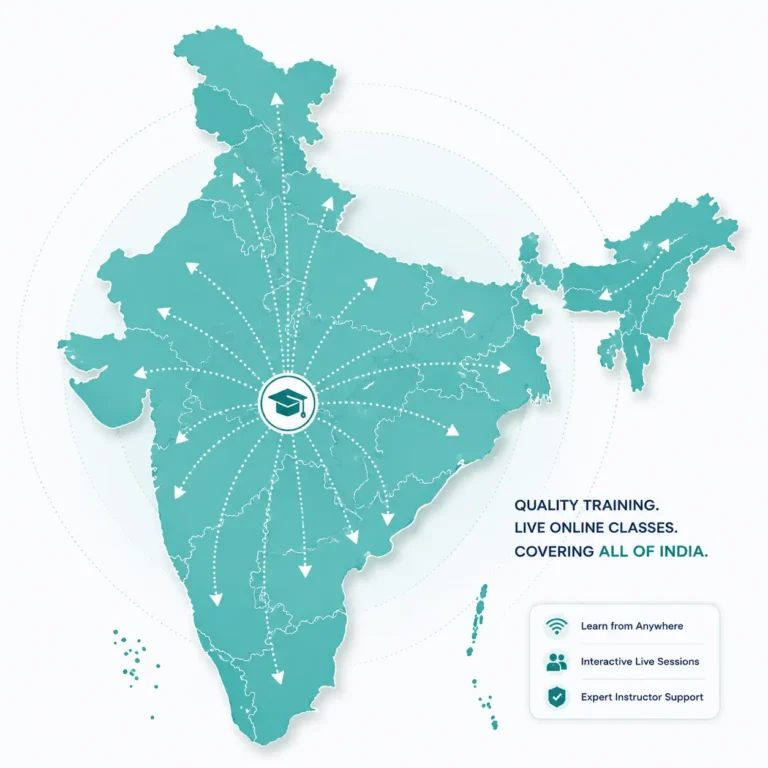
LEARN FROM ANYWHERE IN INDIA
Microsoft Project Online Training – Across India
No matter where you are, quality learning is now just a click away. Our live online training is designed for professionals, engineers, and students across India—from major cities like Chennai, Bangalore, Hyderabad, Cochin, Mumbai, Pune, Delhi, Ahmedabad, Kolkata to remote locations in India. Join our interactive online classes from the comfort of your home or office.
Live Instructor-Led Classes
Real-time interaction and instant doubt clearing.
Weekday & Weekend Batches
Flexible timings for every aspiring learner.
Learn From Anywhere in India
Major cities and remote towns across India.
High-Quality Learning Platform
Same premium experience wherever you join.
Dedicated Support After Completion
Guidance before, during and after training.
Professional Online Training Without Location Barriers
We welcome professionals, engineers, planners, and students from every state and city through our live instructor-led online classes. With flexible weekday and weekend batches, practical project-based learning, and continuous trainer support, you receive the same high-quality learning experience wherever you are.
We Welcome Learners From Across India
South India
- Microsoft Project Online Training in Chennai
- Microsoft Project Online Training in Bangalore
- Microsoft Project Online Training in Hyderabad
- Microsoft Project Online Training in Cochin
- Microsoft Project Online Training in Trivandrum
- Microsoft Project Online Training in Coimbatore
- Microsoft Project Online Training in Madurai
Rest of Indian Cities
- Microsoft Project Online Training in Mumbai
- Microsoft Project Online Training in Delhi
- Microsoft Project Online Training in Kolkata
- Microsoft Project Online Training in Pune
- Microsoft Project Online Training in Ahmedabad
- Microsoft Project Online Training in Visakhapatnam
- Microsoft Project Online Training in Bhopal
FAQs
Frequently Asked Questions About Microsoft Project Online Training
Have questions about our Microsoft Project Online Training? Find answers to the most frequently asked questions about the course, eligibility, duration, practical learning, certification, and career opportunities.
What is Microsoft Project Online Training?
Microsoft Project Online Training is a live instructor-led course that teaches project planning, scheduling, task management, resource allocation, project tracking, and reporting using Microsoft Project. The training combines practical exercises, real-world examples, and hands-on learning to help participants develop job-ready project management skills.
Who should join this Microsoft Project Online Training?
This course is ideal for Project Coordinators, Planning Engineers, Project Managers, Project Engineers, PMO professionals, construction professionals, engineering graduates, final-year students, and anyone interested in building project planning and scheduling skills using Microsoft Project.
Do I need any prior experience to learn Microsoft Project?
No prior experience is required. The course starts with the fundamentals and gradually progresses to advanced Microsoft Project concepts, making it suitable for both beginners and experienced professionals.
What will I learn during the Microsoft Project Online Training?
You will learn project creation, Work Breakdown Structure (WBS), task management, project scheduling, resource allocation, project calendars, baseline creation, progress tracking, Critical Path Analysis, project reporting, and dashboard generation using Microsoft Project.
Do I get hands-on practice during the MS Project training?
Yes. The training includes practical exercises, live demonstrations, and real project examples. Participants gain hands-on experience in creating project plans, managing resources, tracking project progress, and generating professional reports using Microsoft Project.
How long is the Microsoft Project Online Training course?
The course typically runs for 5 to 6 weekdays or 2 weekends for weekend batches. Each live session is designed to provide sufficient time for learning concepts, practical exercises, and interactive discussions.
Can freshers and final-year engineering students join this MS Project course?
Absolutely. Microsoft Project is a valuable skill for fresh graduates and final-year engineering students who want to build careers in project planning, project coordination, scheduling, and project management across various industries.
What career opportunities are available after completing Microsoft Project Training?
After completing the training, you can pursue roles such as Project Coordinator, Project Planner, Project Scheduler, Planning Engineer, PMO Analyst, and Project Manager across industries including construction, engineering, manufacturing, information technology, consulting, and infrastructure.
Will I receive a certificate after completing the course?
Yes. Upon successful completion of the training, you will receive a Course Completion Certificate from Kleios Technologies, recognizing your Microsoft Project knowledge and practical project management skills.
How can I get information about upcoming batches and course fees?
Batch schedules, course fees, and seat availability are updated regularly. Please contact us at +91 75981 01777 via phone or WhatsApp for the latest batch information, enrollment assistance, and course details.
Real Stories.
Real Impact.
We take pride in delivering practical
solutions that help professionals
and organizations achieve measurable results.
⭐⭐⭐⭐⭐ 4.9/5 Average Rating
- Trusted by Project Engineers
- Trusted by Planning Engineers
- Trusted by Project Managers
- Trusted by Graduates & Professionals
My instructor was knowledgeable and explained the concepts clearly. The content was well-structured and comprehensive, making the class very helpful. The sessions were interactive, which I found particularly beneficial. My instructor was attentive to my doubts and adapted the pace to suit my needs. Overall, it was a fantastic learning experience, and I highly recommend Kleios Technologies to anyone looking to learn Primavera.
The online class was well-structured, and Sir's teaching style was engaging and interactive. He provided plenty of examples and hands-on exercises that helped me grasp the material quickly. His patience and willingness to answer questions made me feel comfortable and supported throughout the course. I now feel confident in my ability to use Primavera P6 software effectively.
I recently completed the Primavera P6 course training, and I must say it was an exceptional experience. The training provided a comprehensive understanding of the Primavera P6 software, covering all aspects from basic to advanced levels. The training material was well-structured, and the hands-on exercises helped reinforce the learning. I particularly appreciated the real-world examples and case studies that were used to illustrate the concepts.
We engaged Kleios Technologies for detailed project planning and scheduling support for one of our construction projects. Their approach was practical and well aligned with actual site conditions. The team developed a clear and well-structured schedule with realistic durations and logical sequencing, which helped our project team clearly understand and follow the execution plan.
Their planning support helped us identify risks early and improve coordination. We would recommend Kleios Technologies for reliable and practical project planning services.

Kleios Technologies provides practical Project Management Consulting and live professional training for Engineering, Construction and IT professionals. We help organizations plan better, control smarter and deliver successful projects.
- Project Planning & Scheduling
- Project Controls
- Project Reporting
- Business Analysis
- Risk Management
- Claim Management
- Chennai, India
- +91 75981 01777
- contact@kleiostechnologies.com
- www.kleiostechnologies.com
Working Hours:
Mon–Sun
9:00 AM – 6:00 PM